
Neurohaven Audio System -
Complete Technical Showcase
What Is Neurohaven?
Neurohaven is not a game. It is a 3D virtual conference world — a persistent, explorable, multi-user environment built for the ADHD and neurodiversity community. Think of it as a living, breathing conference venue that happens to exist in a web browser: exhibition halls, theatres, a nightclub, a sanctuary, a festival, a golf course, a library tower, an arcade, an airport, an airship, military aircraft, a commercial jet, a drive-in cinema, and an entire Milky Way galaxy to fly through — all connected by proximity voice chat and real-time multiplayer presence.
The distinction matters because the audio system is not designed around gameplay loops — it is designed around inhabiting a space. Every room, corridor, altitude, and zone has its own sonic character. The system's job is to make you feel like you are there, whether "there" is standing in a conference foyer listening to ambient electronica, dancing on a nightclub floor, sitting in a sanctuary with sound therapy playing, cruising through deep space hearing distant cosmic pings, or standing on festival grounds with DJ sets bleeding between tents.
Architecture Overview
The Master Audio Chain
All primary audio routes through a broadcast-grade signal chain:
Audio Sources → masterGain (1.4, user-adjustable 0–150%) → [7-Band EQ] → masterCompressor → masterLimiter → outputAnalyser → SpeakersStageSettingsPurposeMaster GainDefault 1.4 (boosted above unity), fader 0–150%Ensures presence; user-adjustable via Master Output fader7-Band Parametric EQ±12dB per band, 7 frequenciesUser-controlled tone shapingCompressorThreshold -12dB, Ratio 4:1, Knee 6dB, Attack 5ms, Release 250msEvens out dynamic range across diverse sourcesLimiterThreshold -1dB, Ratio 20:1, Knee 1dB, Attack 0.5ms, Release 60msHard ceiling preventing clipping — broadcast-safeOutput Analyser256-bin FFT, smoothing 0.6Feeds real-time RMS/peak meters and dB readout
This chain means audio from YouTube videos, MP3 playlists, spatial ambience, and voice chat all receive the same professional treatment before hitting your speakers.
Master Output Section (Sound Settings Panel)
The Master Output section provides real-time visual feedback on the final audio signal:
Gain Fader — 0–150% range (maps to 0–2.1× gain). Default 100% = 1.4× gain. Cyan-themed slider.
Output Level Meter — RMS-based bar with green/yellow/red gradient. Shows dB readout (-∞ to 0 dB). Peak hold indicator with slow decay.
Limiter GR (Gain Reduction) Meter — Shows how hard the limiter is working. Green = safe, yellow = moderate, red = heavy limiting.
Signal Legend — Safe (green), Hot (yellow), Limiting (red) indicators with limiter specs (-1dB ceiling, 20:1 ratio).
The 7-Band Parametric EQ
Inserted between master gain and compressor. Each band uses a different filter type for optimal response:
BandFrequencyColourFilter TypeQ Factor160 HzRedLow Shelf0.72170 HzOrangePeaking1.43400 HzYellowPeaking1.441,000 HzGreenPeaking1.452,500 HzCyanPeaking1.466,000 HzIndigoPeaking1.4714,000 HzPurpleHigh Shelf0.7
Presets:
Radio De-Harsh — [+1, 0, 0, -1, -4, -6, -3] dB. Cuts sibilant brightness from streaming radio and YouTube content. Adds subtle bass warmth.
Vocal Clarity — [-2, -1, 0, +3, +4, +2, 0] dB. Boosts the 1K–6K speech intelligibility range while pulling bass mud.
Bass Boost — [+8, +5, +2, 0, 0, 0, 0] dB. Heavy low-end reinforcement for music listening.
Bright — [0, 0, 0, +1, +3, +5, +4] dB. Sparkle and air for flat-sounding laptop speakers.
Warm — [+3, +2, +1, 0, -1, -2, -3] dB. Rolls off highs, boosts lows — vintage tone.
The EQ includes a live 128-bin spectrum analyser canvas and per-band level meters that show real-time energy at each frequency, so users can see exactly what their audio is doing.
Audio Sources & Routing
Sources Routed Through the Master Chain (EQ-Affected)
These audio sources are captured via createMediaElementSource() and routed through the Web Audio API master chain. They benefit from the EQ, compressor, and limiter:
SourceTypeDescriptionVJ / Foyer MusicMediaElementSource → Analyser → masterGainThe main conference music system. Supports both audio and video (with video texture mapped to the foyer screen). Includes its own AnalyserNode driving the VJ bar visualiser.Outdoor AmbienceHTMLAudioElement → masterGainNature/wind loop that plays in exterior zones.Outdoor MusicHTMLAudioElement → masterGainPlaylist or single track for outdoor areas.Sanctuary Foyer MusicHTMLAudioElement → masterGainCalming ambient music in the wellness sanctuary foyer.Floor 3 Market MusicHTMLAudioElement → masterGainBackground music for the third-floor market zone.Festival VIP MusicHTMLAudioElement → masterGainAudio for the festival VIP area.Floor 2 Room AudioHTMLAudioElement × N → masterGainEach club room (Dance Floor, Chill Room, Club Hub, Live Stage) has its own routed audio element.
Sources Using Native Volume Control (Not EQ-Affected)
These use either YouTube's setVolume() API or raw HTMLAudioElement.volume without Web Audio routing:
SourceReasonYouTube iframe players (Theatre, Stages, Festival screens, Cinema)YouTube's API does not expose audio nodes — volume is controlled via player.setVolume(0-100)SFX (UI clicks, launch sounds, stop sounds, wind)One-shot effects that play at fixed volumes — EQ is not appropriateSpace Drone / Deep Space PingsAtmospheric effects scaled by altitude
The Radio System
A standalone draggable radio widget with its own audio engine:
Unsupported image
Stations: LBC, Radio X, Capital, Heart, Smooth, Classic FM, BBC Radio 1/2/4, Kiss FM, Absolute Radio, and more
Audio Engine: HTMLAudioElement for MP3/AAC streams, YouTube IFrame API for video-based stations
Max Gain: Hard-capped at RADIO_MAX_GAIN = 0.35 to prevent dominance over spatial audio
Volume Fader: Default 80%, user-adjustable 0–100%
Spatial Audio & Zone System
Zone-Based Proximity Audio
Neurohaven does not use Three.js PositionalAudio. Instead, it implements a custom zone-triggered proximity system that is far more flexible:
Trigger Zones — The world is divided into named rectangular regions (e.g., outsideZone, theatreZone, festivalZone, sanctuaryZone). Each zone has associated audio sources.
Volume Smoothing — Every zone audio source has a smoothVol property. Volume changes are lerped using dt * FADE_SPEED (typically 1.5–10.0) to create natural crossfades as the player moves between zones. There are no hard cuts.
Corridor Attenuation — When the player is in a corridor between rooms, the system calculates a corridorVolumeFactor based on distance to room entrances, allowing sound to "bleed" realistically from rooms into hallways — just like real buildings.
Vertical Scaling — Ambient sounds are tied to the player's Y-coordinate:
Wind fades in at 50m altitude, peaks at 300m, fades out by 1500m as you enter space
Space Drone fades in at high altitude with a deep, continuous hum
Deep Space Pings trigger randomly every 8–28 seconds above 5000m altitude
Outdoor music fades between OUTDOOR_MUSIC_ALT_FULL (1000m) and OUTDOOR_MUSIC_ALT_FADE_OUT (1500m)
Key Spatial Parameters
ParameterValueDescriptionOUTDOOR_AMB_OUTSIDE0.14Outdoor ambience level in exterior zonesOUTDOOR_AMB_FESTIVAL0.05Reduced ambience at the festival (DJ audio dominates)OUTDOOR_AMB_SANCT_FOYER0.10Subtle nature sounds bleeding into sanctuaryOUTDOOR_AMB_DESERT0.14Desert/open area ambienceOUTDOOR_MUSIC_MAX_VOL0.40Maximum volume for outdoor musicSANCT_FOYER_MAX_VOL0.50Sanctuary foyer music ceilingF2_MAX_VOL0.85Floor 2 club rooms — louder for immersionF3_MARKET_MAX_VOL0.45Market area musicFEST_VIP_MAX_VOL0.45Festival VIP area
Altitude-Based Audio Transitions
Ground (0m) → Outdoor ambience + zone music50m → Wind begins
300m → Wind at maximum
1000m → Outdoor music at full
1500m → Outdoor music fades, space drone begins
2000m+ → Space arena zone
3000m+ → Solar system — procedural planets
5000m+ → Deep space — cosmic pings every 8-28 seconds
Proximity Voice Chat
WebRTC Architecture
The voice system uses peer-to-peer WebRTC connections with Socket.IO signaling:
ICE Servers: Multiple Google STUN servers + Metered.ca TURN servers for NAT traversal
Audio Processing: Browser-native echoCancellation, noiseSuppression, and autoGainControl
Peer Audio Chain: MediaElementSource → GainNode → AnalyserNode → audioContext.destination
Distance-Based Attenuation
DistanceVolumeBehaviour0–5 metres100%Full volume, like standing next to someone5–20 metresLinear falloffGradually fades — 1.0 - (dist - 5) / 1520+ metres0%Silent — connection maintained briefly, then dropped at 25m
Smoothing: Volume changes use gainNode.gain.setTargetAtTime() with a 0.1s time constant, preventing audio pops during movement.
Floor Isolation: Players on different floors cannot hear each other via proximity — strict floor-based separation.
Hysteresis: Connect threshold is 20m, disconnect threshold is 25m. This 5m buffer prevents connection flickering when a player hovers near the edge of voice range.
Private Voice Calls
Bypass all proximity logic:
Initiation: Player opens another player's info card → clicks "Call"
Ringing: Target sees a call screen with accept/decline
Connected: Both players hear each other at full volume regardless of distance or floor
Call Bar: A persistent UI bar appears showing the active call with a "Leave" button
Private calls use the privateGroupMembers set — these peers are always connected and always at maximum gain.
Speech Detection
Runs every 200ms via AnalyserNode:
Samples the first 32–40 frequency bins
If peak value exceeds threshold (40), the onSpeakingChange callback fires
Drives the UI speaking indicators (pulsing name tags, mic level meters)
User Controls
Sound Settings Panel (Z key)
A three-column modal accessible from the HUD or by pressing Z:
Column 1 — Volume Controls (280px):
Master Audio on/off toggle (M key)
Music & Ambience volume fader (default 80%)
Sound Effects volume fader (default 80%)
Microphone enable/disable/mute
Other Players volume fader (default 85%) with mute toggle
Column 2 — EQ & Master Output (320px):
7 vertical faders (±12dB, 0.5dB step)
Per-band level meters with colour-coded bars
Live 128-bin spectrum analyser canvas
5 one-tap presets (Radio De-Harsh, Vocal Clarity, Bass Boost, Bright, Warm)
Reset Flat button
Master Output section:
Gain fader (0–150%, default 100% = 1.4× gain, cyan-themed)
RMS output level meter with green/yellow/red gradient and dB readout (-∞ to 0 dB)
Peak hold indicator with slow decay
Limiter GR (Gain Reduction) meter showing limiting intensity
Signal legend: Safe (green), Hot (yellow), Limiting (red) with limiter specs (-1dB ceiling, 20:1 ratio)
Column 3 — Proximity & Voice Guide (280px):
Visual explanation of voice chat distance ranges
Private call walkthrough with animated UI mockup
Default Fader Positions
FaderDefaultPurposeMusic80%Safe broadcast level — 100% is the ceilingSFX80%Includes wind, launch sounds, UI clicksVoice85%Other players' voicesRadio80%Standalone radio widget
These defaults are calibrated so that 100% on any fader is the safe maximum — the compressor and limiter prevent distortion even at full volume.
Audio Source Gain Reference
SFX Volumes (Relative to SFX Fader)
SoundGainTriggerUI Click0.18 × sfxVolEvery button/menu interactionEscape Sound0.35 × sfxVolClosing menusLaunch Sound0.50 × sfxVolLaunching from groundStop/Brake Sound0.50 × sfxVolHard brakingHyperdrive Whoosh0.25 × sfxVolEntering hyperdriveSpace Entry0.20 × sfxVolBreaking atmosphereHyperdrive Riser0.25 × sfxVolSpeed build-upDeep Space Hit0.30 × sfxVolEntering deep space zoneCrossing Descent0.20 × sfxVolDescending through atmosphereDeep Space Pings0.04 × sfxVolRandom cosmic pings (pool of sounds)High Wind0.25 × sfxVol (max)Altitude-based, peaks at 300m
Music/Ambience Max Volumes
SourceMax VolumeNotesVJ Foyer MusicControlled by VJ gain nodeCut at -6dB from sourceFloor 2 Club Rooms0.85Loudest zone — nightclub immersionOutdoor Ambience0.14Subtle nature layerOutdoor Music0.40Main outdoor playlistSanctuary Foyer0.50Calming musicFestival GroundsVariable per tent/stageEach stage has independent YouTube playerYouTube Screens~55 (YT scale 0-100)Theatre, auditoriums, cinemaRadio0.35 max (RADIO_MAX_GAIN)Hard-capped to prevent dominance
Technical Capabilities Summary
What the Audio System Can Do
Broadcast-grade output — Compressor + limiter chain ensures consistent, safe loudness across all content
Real-time parametric EQ — 7-band user-adjustable EQ with shelf filters on the extremes and peaking filters for mid-bands
Zone-aware crossfading — Seamless audio transitions between rooms, corridors, outdoors, and altitude layers
Proximity voice chat — WebRTC peer-to-peer with smooth distance-based attenuation
Private voice calls — Full-volume cross-floor communication with call UI
Altitude-reactive soundscape — Wind, space drone, and cosmic pings create a living atmosphere tied to height
Multi-source mixing — YouTube, MP3 playlists, live radio streams, spatial ambience, SFX, and voice all mixed simultaneously
Live spectrum analysis — Real-time FFT visualisation of the post-EQ signal
Per-band level metering — Individual frequency band energy display
Master output metering — Post-limiter 256-bin FFT driving RMS/peak meters, dB readout, and limiter gain reduction display
Speech detection — AnalyserNode-based voice activity detection for UI indicators
Corridor sound bleed — Realistic attenuation of room audio into connecting corridors
VJ video-audio sync — Video textures mapped to in-world screens with synchronised audio through the Web Audio analyser
Playlist management — Shuffle, skip, previous track, crossfade for outdoor music
Independent zone volumes — Each area (festival tent, club room, sanctuary room) has its own gain and fade speed
Master mute — Single key (M) kills all audio instantly, including voice
What Makes This Unusual
Most web-based 3D environments use either Three.js PositionalAudio (which ties you to the renderer's audio model) or simple HTMLAudioElement volume controls. Neurohaven uses neither as its primary system.
Instead, it implements a hybrid architecture:
Web Audio API for the master chain (gain → EQ → compression → limiting)
HTMLAudioElement routing through createMediaElementSource() for zone music
YouTube IFrame API for video content with independent volume control
WebRTC for real-time voice with custom gain staging
Custom zone-trigger proximity logic replacing Three.js spatial audio
This gives complete control over every aspect of the mix — something normally only available in dedicated audio middleware like FMOD or Wwise, but running entirely in the browser with zero plugins.
Signal Flow Diagram
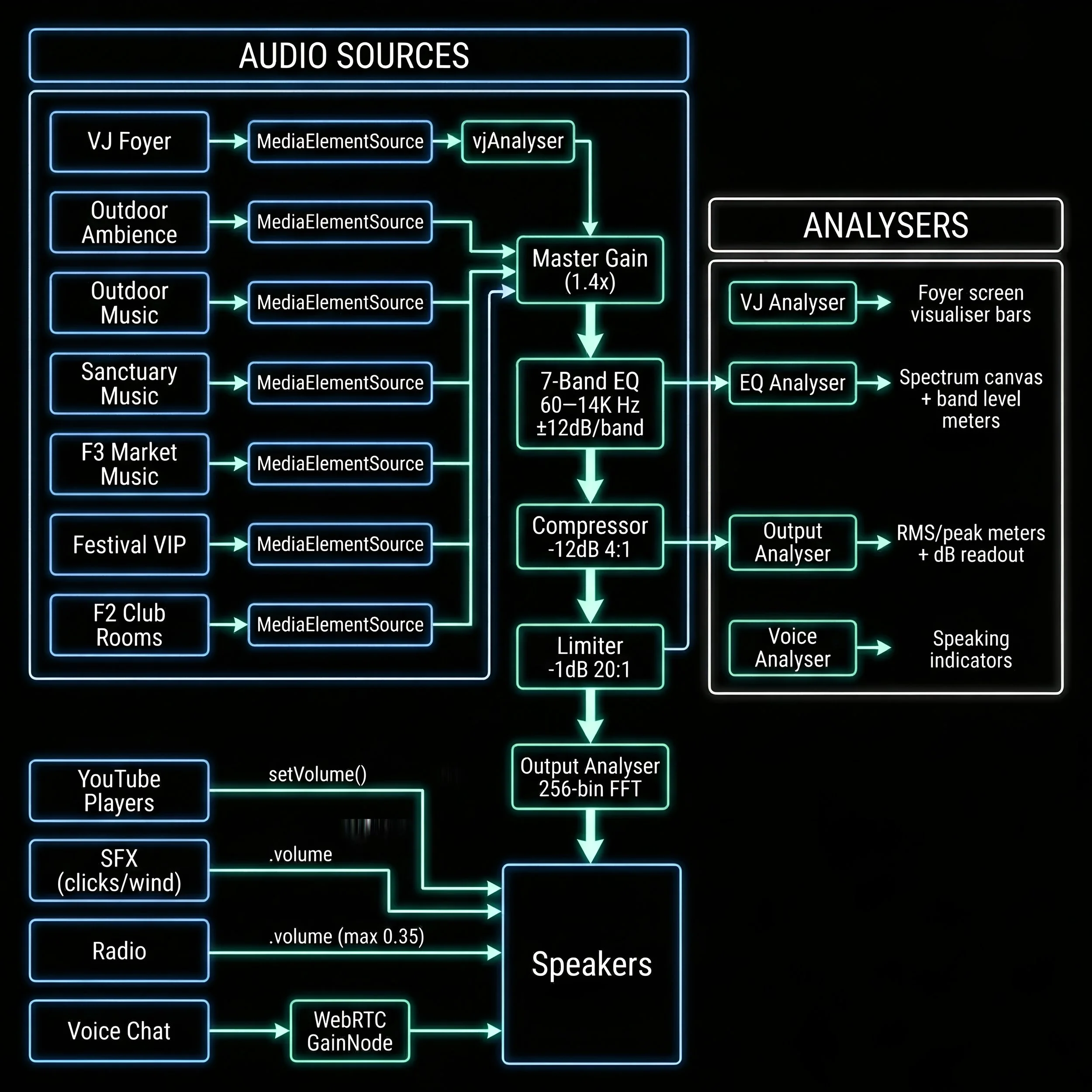
This document describes the Neurohaven Expo audio system as of April 2026.
The system processes all audio in real-time in the browser using the Web Audio API, WebRTC, and YouTube IFrame API — no plugins, no downloads, no middleware.